

| 일 | 월 | 화 | 수 | 목 | 금 | 토 |
|---|---|---|---|---|---|---|
| 1 | 2 | 3 | 4 | 5 | ||
| 6 | 7 | 8 | 9 | 10 | 11 | 12 |
| 13 | 14 | 15 | 16 | 17 | 18 | 19 |
| 20 | 21 | 22 | 23 | 24 | 25 | 26 |
| 27 | 28 | 29 | 30 |
- ultra low latency
- futures options
- system trading
- dma hft
- 프랍데스크
- Arbitrage Trading
- trading engineering
- dma fep
- high frequency trading
- Korea dma
- Korea krx
- DMA개발
- 자동매매
- HFT system
- fep개발
- 시스템 트레이딩
- 주문fep
- 주문 오더북
- mmlp
- dma development
- low latency trading
- hft개발
- low latency
- korea inbound
- 트레이딩 엔지니어링
- hft tuning
- 저지연시스템
- algo trading
- speed trading
- KRX HFT
- Today
- Total
Fontes Fintech
Why NUMA and Memory Locality Matter in Low-Latency Trading Systems | Trading Engineering — Deep Dive #4 본문
Why NUMA and Memory Locality Matter in Low-Latency Trading Systems | Trading Engineering — Deep Dive #4
폰테스 핀테크 :: 금융거래의 안전한 미래 2026. 9. 24. 15:59Why NUMA and Memory Locality Matter in Low-Latency Trading Systems
Trading Engineering — Deep Dive #4
In low-latency trading systems, CPU performance is only part of the story.
Where the data is located can be just as important.
Modern servers may use multiple CPU sockets and NUMA (Non-Uniform Memory Access) architectures. In such systems, memory access does not always have the same cost.
Even within a single server, the latency of a memory access can depend on:
Which CPU is accessing which memory.
This makes NUMA and Memory Locality important considerations when designing high-performance trading systems.
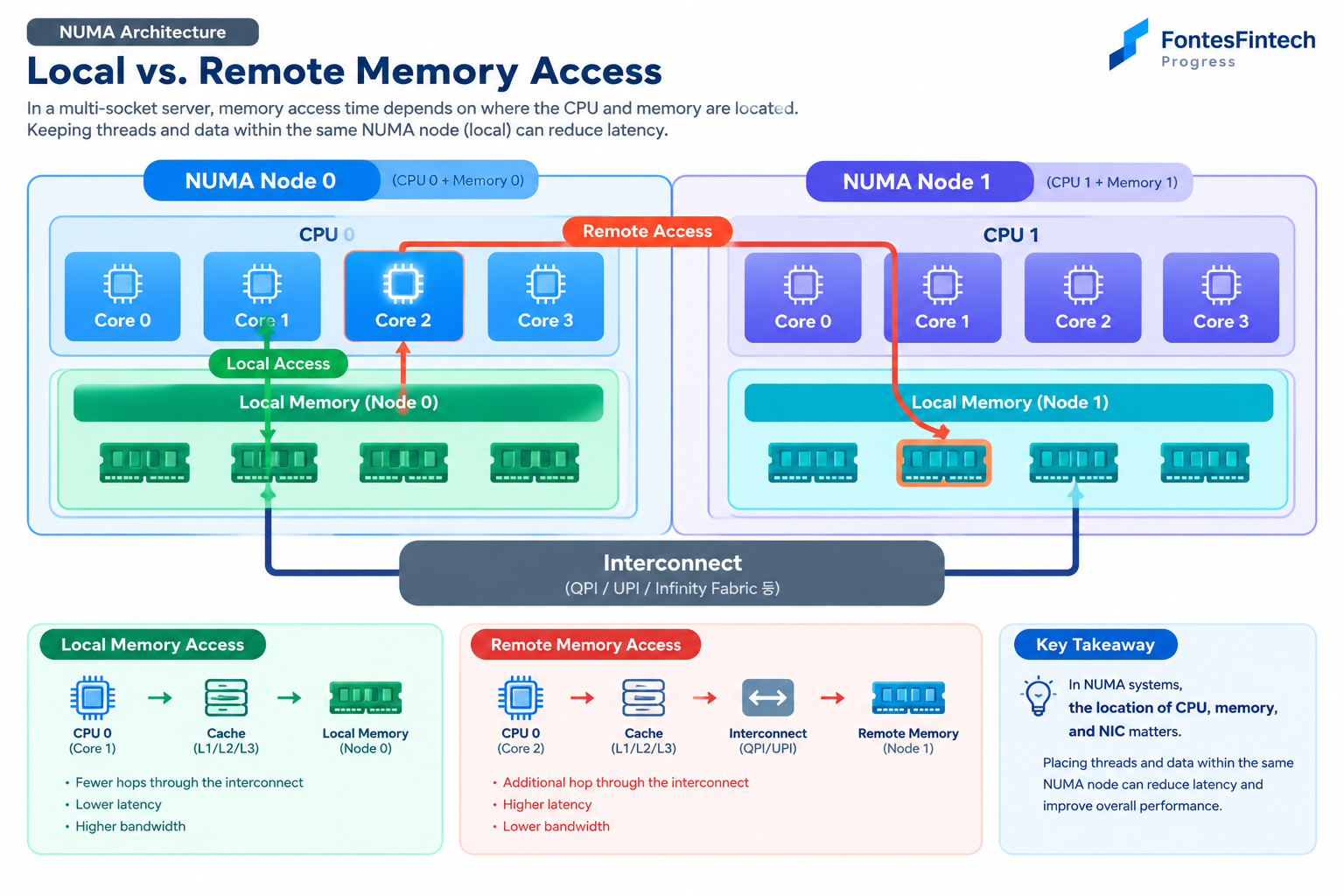
1. What Is NUMA?
NUMA stands for Non-Uniform Memory Access.
The name describes the fundamental characteristic of the architecture:
Memory access cost is not necessarily uniform.
In a simple single-CPU system, we might imagine:
CPU
 ↓
Memory
The CPU accesses the system memory through a relatively simple path.
A multi-socket server can look different:
        CPU 0                         CPU 1
          │                            │
      Local Memory                 Local Memory
          │                            │
          └────────── Interconnect ───┘
Memory physically associated with CPU 0 is typically considered local memory for CPU 0.
Memory associated with CPU 1 is local to CPU 1.
Therefore:
CPU 0 → Memory 0    Local Access

CPU 0 → Memory 1    Remote Access
The two accesses can follow different paths through the system.
2. Why Does Memory Locality Matter?
Low-latency systems are not only about reducing CPU instructions.
The CPU also needs to access data efficiently.
A simplified data path looks like:
CPU
 ↓
Cache
 ↓
Memory
If the required data is already available in a nearby cache, the CPU may avoid accessing main memory altogether.
When memory access is required, local memory is generally preferable to remote memory.
For example:
Local Access

CPU 0
  │
  ↓
Memory 0
versus:
Remote Access

CPU 0
  │
  ↓
Interconnect
  │
  ↓
Memory 1
Remote memory access introduces additional communication through the system interconnect.
In high-frequency or high-throughput workloads, these additional costs can become relevant.
3. CPU Affinity and NUMA Should Be Considered Together
In Deep Dive #3, we discussed CPU Affinity and Core Pinning.
But fixing a thread to a CPU core is only part of the problem.
Consider:
CPU Core 0
   │
   └── NUMA Node 0
          │
       Memory 0
A thread running on Core 0 may still repeatedly access memory located on another NUMA node.
Therefore, CPU placement alone does not guarantee good locality.
A low-latency system should consider:
Thread
   ↓
CPU Core
   ↓
NUMA Node
   ↓
Memory
as a connected system.
4. Think About the Physical Relationship Between CPU and Memory
A simplified multi-socket server might look like this:
          NUMA Node 0              NUMA Node 1

        ┌─────────────┐          ┌─────────────┐
        │   CPU 0     │          │   CPU 1     │
        │  Core 0~N   │          │  Core 0~N   │
        └──────┬──────┘          └──────┬──────┘
               │                        │
          Memory 0                  Memory 1
               │                        │
               └────── Interconnect ────┘
If an application running primarily on NUMA Node 0 accesses Memory 0, the data path remains local.
If it frequently accesses Memory 1, the request may have to cross the interconnect.
This is why CPU placement and data placement should be designed together.
5. What Does This Mean for a Trading System?
Consider a simplified trading architecture:
Market Data
     ↓
Order Book
     ↓
Strategy
     ↓
Risk Check
     ↓
Order Manager
     ↓
DMA / FEP
If these components are distributed across different NUMA nodes, data may repeatedly cross NUMA boundaries.
For example:
NUMA Node 0

Market Data
     ↓
Order Book
     ↓
Strategy
     ↓
Risk
     ↓
Order Manager
A different NUMA node could then be used for:
NUMA Node 1

Monitoring
Logging
Administration
Other Services
This type of separation can help keep latency-sensitive processing within a locality domain.
However, the optimal architecture depends on the actual workload and hardware topology.
6. The NIC Matters Too
For trading systems, looking only at CPU and memory is not enough.
The network interface card (NIC) also has a physical relationship with the NUMA topology.
For example:
             NUMA Node 0
        ┌──────────────────┐
        │ CPU              │
        │ Memory           │
        │                  │
        │ NIC              │
        └──────────────────┘
If the NIC and the processing CPU are located within the same NUMA domain, the data path can be more local.
Compare this with:
CPU 0
 │
 ↓
NUMA 0
 │
Interconnect
 │
 ↓
NUMA 1
 │
NIC
In this case, network data may have to cross the NUMA interconnect before reaching the CPU.
Therefore, for high-performance network applications, it is useful to understand the complete topology:
CPU ↔ Memory ↔ NIC
7. Memory Allocation Matters
In a NUMA system, simply calling malloc() does not mean that the developer has explicitly controlled where the physical memory will reside.
Actual memory placement can depend on the operating system and NUMA memory policies.
Linux provides several mechanisms for inspecting and controlling NUMA behavior.
Common tools and libraries include:
numactl
libnuma
For example:
numactl --cpunodebind=0 --membind=0 ./trading_app
Conceptually, this requests that the application run on NUMA Node 0 and allocate memory from Node 0.
In production environments, however, CPU topology, other processes, memory pressure, and system-wide resource allocation must also be considered.
8. First-Touch and Memory Placement
NUMA systems also make the concept of First-Touch important.
A simplified view is:
Memory Allocation
       ↓
Physical Page Placement
       ↓
Influenced by First Access
For example:
buffer = malloc(size);

/* CPU 0 */
initialize(buffer);
If the memory is subsequently accessed heavily by CPU 1, the application's actual locality may not match what the developer originally intended.
For large memory regions, understanding how pages are placed can therefore be important.
9. Shared Memory Is Also Affected by NUMA
Shared Memory is frequently used in financial systems for high-performance inter-process communication.
For example:
Market Data Process
        │
        ↓
   Shared Memory
        │
        ↓
Strategy Process
Shared Memory can avoid some forms of data copying, but that does not automatically make the entire data path optimal.
If multiple processes on different NUMA nodes repeatedly access and modify the same data, additional memory traffic and cache-coherency traffic can occur.
Therefore:
Shared Memory does not automatically mean maximum performance.
A more accurate principle is:
Shared Memory + Good CPU/Memory Locality
10. NUMA and CPU Cache Are Connected
In Deep Dive #1, we discussed CPU Cache.
NUMA should not be viewed as an independent topic.
A simplified hierarchy looks like:
Thread
  ↓
CPU Core
  ↓
L1 / L2 Cache
  ↓
L3 Cache
  ↓
Local Memory
  ↓
Remote Memory
The further data is from the CPU executing the workload, the more complex the access path can become.
Therefore, performance optimization should not simply focus on CPU frequency or instruction count.
We should consider the complete path:
Thread Placement
       ↓
CPU Core
       ↓
Cache Locality
       ↓
Memory Locality
       ↓
NUMA Locality
       ↓
Network Locality
11. Common NUMA Problems
1. Remote Memory Access
A CPU frequently accesses memory belonging to another NUMA node.
2. Poor CPU Placement
A thread runs on one NUMA node while the data it frequently accesses resides on another.
3. Excessive Data Sharing
Threads on different NUMA nodes frequently modify the same data.
4. Excessive Cross-NUMA Communication
Multiple processing stages repeatedly move data between NUMA nodes.
These situations can reduce the benefits of a carefully optimized low-latency architecture.
12. How Should NUMA Be Measured?
NUMA optimization should also begin with measurement.
First, understand the server topology.
Linux provides tools such as:
lscpu
numactl --hardware
numastat
Application-level metrics can also be useful:
- CPU utilization
- CPU migration
- Cache misses
- Memory bandwidth
- Memory latency
- NUMA hit / miss
- Remote memory access
- Context switches
- IPC
- P50 latency
- P95 latency
- P99 latency
- P99.9 latency
- Throughput
For trading systems, it is particularly important to examine tail latency rather than relying only on average latency.
13. Basic Principles of NUMA Optimization
Not every system requires complex NUMA-aware optimization.
However, high-performance systems can benefit from several basic principles.
Keep CPU and Data Close
Thread
  ↓
CPU
  ↓
Local Memory
Reduce Cross-NUMA Communication
Avoid unnecessary movement of data between NUMA nodes.
Define Data Ownership
Allow each thread or NUMA node to primarily manage the data it owns.
Minimize Shared Mutable Data
Avoid unnecessary sharing of frequently modified data.
Understand NIC Topology
Know which NUMA node the network interface is attached to.
Benchmark Before and After
Validate changes using real workloads rather than assumptions.
14. Think of CPU, Memory and NIC as One System
In low-latency trading systems, it is useful to view CPU, memory, and networking as one continuous data path.
A simplified model is:
             CPU
              │
              ↓
            Cache
              │
              ↓
           Memory
              │
              ↓
            NIC
              │
              ↓
          Network
The actual architecture is much more complex.
But the key question is simple:
Where does the data travel inside the system?
During that journey, we need to ask:
- Does the thread move to another CPU?
- Does cache locality break?
- Does the data cross a NUMA boundary?
- Does the CPU access remote memory?
- Is the NIC attached to another NUMA node?
- Is unnecessary data copying occurring?
15. FontesFintech Engineering Approach
Low-latency performance is rarely determined by one isolated technology.
CPU Affinity does not automatically make a system faster.
Shared Memory does not automatically make a system faster.
Similarly, NUMA awareness alone does not guarantee lower latency.
The important thing is to understand the complete data path.
Network
   ↓
NIC
   ↓
CPU Core
   ↓
Cache
   ↓
Memory
   ↓
Application
In a multi-socket system, NUMA topology becomes another layer of that path.
Therefore, when designing low-latency systems, we consider:
Thread Placement
→ CPU Locality
→ Cache Locality
→ Memory Locality
→ NUMA Locality
→ Network Locality
as one continuous system.
Conclusion
NUMA is not simply a hardware architecture concept.
In low-latency trading systems, where the CPU gets its data from can affect latency, throughput, and latency predictability.
Once CPU Affinity and Core Pinning are introduced, the next natural question is:
Where is the memory that this CPU is accessing?
That question leads directly to NUMA and Memory Locality.
Ultimately, the principle is:
Right Thread. Right Core. Right Memory.
And when networking is included:
Right Thread. Right Core. Right Memory. Right NIC.
Next: Trading Engineering — Deep Dive #5
epoll vs. Busy Polling in Low-Latency Trading Systems
The next article examines how Linux applications wait for network events, and why the choice between event-driven I/O and Busy Polling can matter in low-latency trading systems.


