Why CPU Affinity and Core Pinning Matter in Low-Latency Trading Systems | Trading Engineering — Deep Dive #3
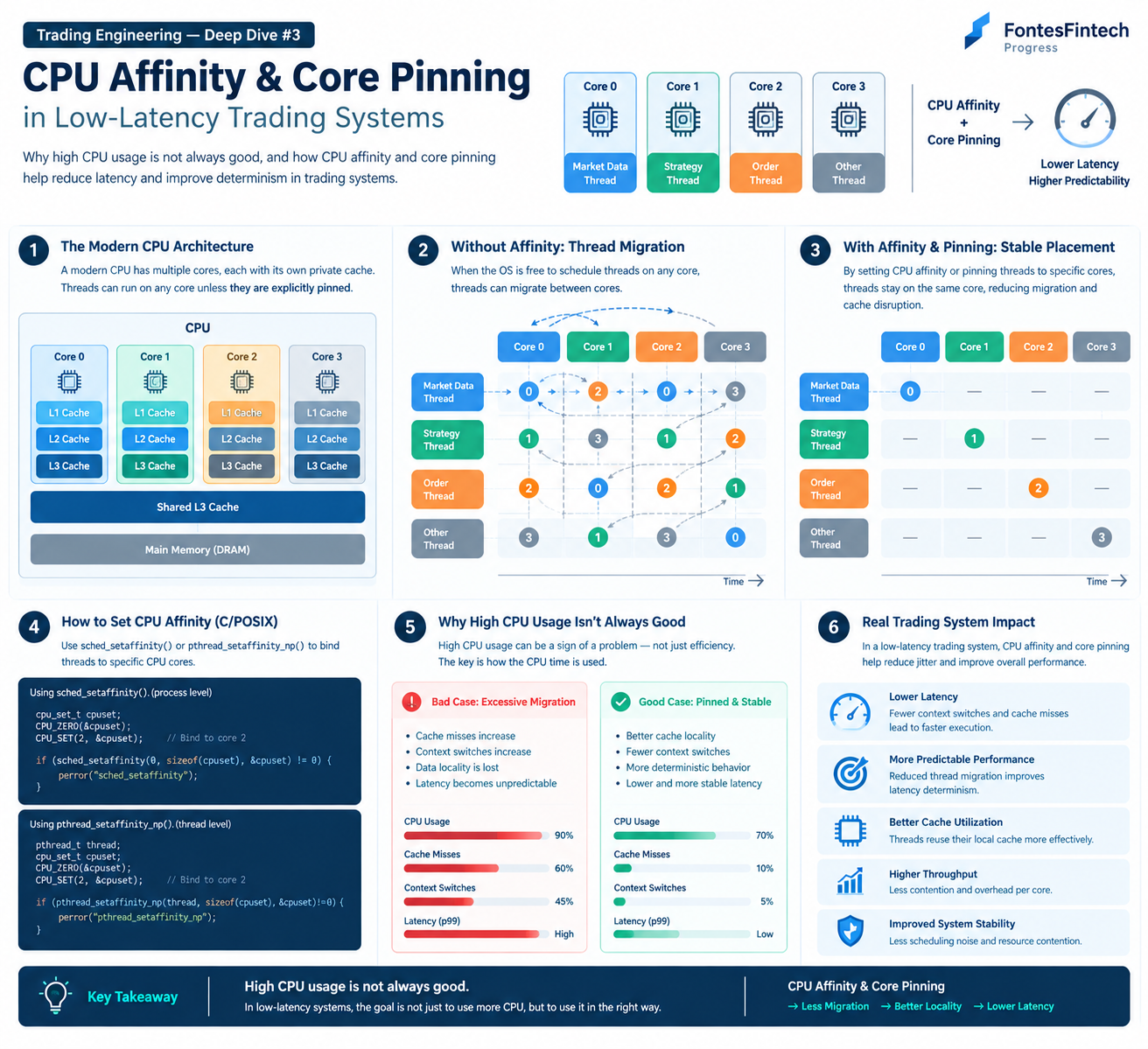
Why CPU Affinity and Core Pinning Matter in Low-Latency Trading Systems
Trading Engineering — Deep Dive #3
In low-latency trading systems, CPU utilization alone does not tell the whole story.
It also matters which thread runs on which CPU core, how often threads move between cores, and how efficiently each thread can reuse the data already present in the CPU cache.
This is where CPU Affinity and Core Pinning become important.
1. What Is CPU Affinity?
CPU Affinity is the mechanism used to restrict a process or thread to a specific set of CPU cores.
For example, a trading application may have several important threads:
- Market Data Thread
- Strategy Thread
- Risk Check Thread
- Order Management Thread
- FEP / Network Thread
Without any CPU affinity configuration, the operating system scheduler can move these threads between available CPU cores.
With CPU affinity, we can limit where a thread is allowed to execute.
Example
Market Data Thread  → Core 0
Strategy Thread     → Core 1
Order Thread        → Core 2
Other Threads       → Core 3
This does not necessarily make the application faster in every situation.
The main goal is to make execution more predictable and to improve data locality.
2. What Is Core Pinning?
Core Pinning is a more specific form of CPU placement where a thread is assigned to a particular CPU core.
For example:
Market Data → Core 0
Strategy    → Core 1
Order       → Core 2
The terminology is sometimes used interchangeably with CPU affinity.
A useful distinction is:
- CPU Affinity — defines the CPUs on which a thread is allowed to run.
- Core Pinning — fixes a thread to a particular CPU core or tightly restricts its placement.
The exact terminology may vary depending on the operating system and engineering context.
3. Why Thread Migration Matters
Consider a thread that initially runs on Core 0.
Later, the scheduler moves it to Core 2.
The thread itself continues executing, but the CPU cache state associated with its previous execution is no longer in the same place.
Before

Thread
  ↓
Core 0
  ↓
Local Cache


After Migration

Thread
  ↓
Core 2
  ↓
Different Cache State
The thread may need to access data that is no longer available in the same cache hierarchy.
This can increase cache misses and memory access latency.
More importantly for trading systems, repeated migration can introduce latency variation.
In a system where average latency is already very low, this variation can become significant.
4. CPU Cache Locality
CPU affinity is closely related to the concept of data locality.
Modern CPUs have multiple levels of cache:
- L1 Cache
- L2 Cache
- L3 Cache
- Main Memory (DRAM)
Data that is already available in a nearby cache can generally be accessed much faster than data that must be fetched from main memory.
Therefore, keeping a thread on the same CPU core can help it repeatedly access data that remains warm in the cache.
This is particularly relevant for workloads such as:
- Market data processing
- Order book updates
- Risk checks
- Strategy calculations
- Order generation
- Message queues
The important point is not simply to keep a thread on one core.
The real objective is to maintain good locality between computation and data.
5. Setting CPU Affinity in C
On Linux, CPU affinity can be configured using APIs such as:
#include <sched.h>

cpu_set_t cpuset;

CPU_ZERO(&cpuset);
CPU_SET(2, &cpuset);

if (sched_setaffinity(0, sizeof(cpuset), &cpuset) != 0) {
    perror("sched_setaffinity");
}
This example restricts the calling process to CPU core 2.
For thread-level affinity, Linux provides:
pthread_setaffinity_np()
For example:
cpu_set_t cpuset;

CPU_ZERO(&cpuset);
CPU_SET(2, &cpuset);

if (pthread_setaffinity_np(
        thread,
        sizeof(cpuset),
        &cpuset) != 0) {
    perror("pthread_setaffinity_np");
}
In production systems, error handling, CPU topology, thread lifecycle, and interaction with other system components should also be considered.
6. High CPU Usage Is Not Always Good
It is tempting to think:
Higher CPU utilization means better performance.
For low-latency systems, this is not necessarily true.
A CPU running at 100% utilization may be doing useful work.
But it may also be spending CPU time on:
- Thread migration
- Context switching
- Lock contention
- Cache misses
- Synchronization
- Unnecessary memory access
- Interrupt handling
Therefore, simply increasing CPU utilization does not guarantee lower latency.
A better question is:
How is the CPU time being used?
7. CPU Affinity in a Trading System
Consider a simplified trading architecture:
Market Data
     ↓
Strategy
     ↓
Risk Check
     ↓
Order Manager
     ↓
DMA / FEP
     ↓
Exchange
One possible CPU layout could be:
Core 0 → Market Data
Core 1 → Strategy
Core 2 → Risk / Order
Core 3 → DMA / FEP
Core 4+ → Monitoring / Other Tasks
This is only an example.
The optimal configuration depends on:
- Number of CPU cores
- CPU topology
- SMT / Hyper-Threading
- NUMA topology
- NIC placement
- Interrupt configuration
- Application architecture
- Workload
- Message rate
There is no universal CPU-pinning configuration that is optimal for every trading system.
8. CPU Affinity and Other Low-Latency Techniques
CPU affinity should not be considered independently.
It interacts closely with other low-latency techniques.
CPU Affinity + Cache Locality
Keeping a thread on the same core can improve the reuse of local cache data.
CPU Affinity + False Sharing
Even if threads are pinned to different cores, excessive sharing of cache lines can cause cache-coherency traffic.
This is why CPU placement and data placement should be considered together.
CPU Affinity + Lock Contention
Moving threads to different cores does not eliminate lock contention.
If multiple threads frequently compete for the same lock, the synchronization mechanism itself can become the bottleneck.
CPU Affinity + NUMA
On multi-socket or NUMA systems, CPU placement also affects memory access.
A thread running on one NUMA node may access memory attached to another node.
Therefore:
CPU
 ↓
Memory
 ↓
NIC
should be considered as a single topology rather than as independent components.
9. What Should Be Measured?
Before applying CPU pinning, it is important to establish a baseline.
Useful metrics include:
- CPU utilization
- CPU cycles
- Instructions per cycle (IPC)
- Context switches
- CPU migrations
- Cache misses
- Lock contention
- Memory latency
- Throughput
- P50 / P95 / P99 / P99.9 latency
For trading systems, tail latency is particularly important.
A configuration that slightly improves average latency but significantly worsens P99 latency may not provide the desired result.
10. Do Not Pin Everything
CPU pinning is not automatically beneficial.
If too many important threads are assigned to a small number of cores, those cores can become overloaded.
For example:
Core 0
 ├─ Market Data
 ├─ Strategy
 ├─ Risk
 └─ Order
This may create a new bottleneck.
Another consideration is SMT / Hyper-Threading.
Two logical CPUs may share physical execution resources, caches, or other parts of the CPU architecture.
Therefore, simply seeing more logical CPUs does not necessarily mean that the system has the same number of independent physical cores.
11. Measure Before and After
CPU affinity should be treated as an engineering optimization rather than a configuration rule.
A practical process is:
Measure
   ↓
Identify Migration / Cache / CPU Issues
   ↓
Apply CPU Affinity
   ↓
Benchmark
   ↓
Measure Again
The objective is not:
"Use CPU pinning because low-latency systems use CPU pinning."
The objective is:
Use CPU placement when measurements show that CPU scheduling and locality are affecting the system.
12. FontesFintech Engineering Approach
In low-latency trading systems, performance is determined by the interaction between:
Thread Placement → CPU Core → Cache Locality → Data Access → Synchronization → Network → Latency
Therefore, we do not view CPU affinity as an isolated optimization technique.
It is part of a broader system architecture that considers:
- Thread placement
- CPU topology
- Memory locality
- Shared memory
- Cache behavior
- Lock contention
- Network processing
- Message processing
- End-to-end latency
The goal is not simply to make the CPU work harder.
The goal is to make the right thread execute on the right core while accessing the right data at the right time.
Conclusion
CPU Affinity and Core Pinning can help reduce unnecessary thread migration, improve cache locality, and make latency more predictable.
However, pinning itself is not a guarantee of better performance.
The correct approach is to understand the CPU topology, application architecture, workload, memory locality, and network configuration—and then validate the result through measurement.
Key Takeaway
In low-latency systems, how the CPU is used matters as much as how much CPU is used.
Right Thread. Right Core. Right Data.
Next: Trading Engineering — Deep Dive #4
NUMA and Memory Locality in Low-Latency Trading Systems
As systems scale to multiple CPU sockets and NUMA architectures, the physical location of memory becomes another important factor in latency.