

| 일 | 월 | 화 | 수 | 목 | 금 | 토 |
|---|---|---|---|---|---|---|
| 1 | 2 | 3 | ||||
| 4 | 5 | 6 | 7 | 8 | 9 | 10 |
| 11 | 12 | 13 | 14 | 15 | 16 | 17 |
| 18 | 19 | 20 | 21 | 22 | 23 | 24 |
| 25 | 26 | 27 | 28 | 29 | 30 | 31 |
- 자동매매
- DMA개발
- futures options
- low latency
- hft tuning
- korea inbound
- 주문fep
- mmlp
- trading engineering
- 주문 오더북
- speed trading
- dma hft
- kernel bypass
- hft programming
- nic offload
- hft개발
- dma fep
- system trading
- ultra low latency
- 시스템 트레이딩
- dma development
- HFT system
- 프랍데스크
- high frequency trading
- KRX HFT
- 트레이딩 엔지니어링
- 저지연시스템
- Korea dma
- fep개발
- algo trading
- Today
- Total
Fontes Fintech
Why NIC Offload and Kernel Networking Matter in Low-Latency Trading Systems | Trading Engineering — Deep Dive #7 본문
Why NIC Offload and Kernel Networking Matter in Low-Latency Trading Systems | Trading Engineering — Deep Dive #7
폰테스 핀테크 :: 금융거래의 안전한 미래 2026. 10. 1. 00:39Why NIC Offload and Kernel Networking Matter in Low-Latency Trading Systems
Trading Engineering — Deep Dive #7
In the previous articles, we examined CPU Cache, False Sharing, CPU Affinity, NUMA, Polling, Interrupts, and Network Latency.
All of these topics eventually lead to one important component:
The Network Interface Card — NIC.
In a low-latency trading system, the NIC is not simply a device that connects the server to the network.
It is part of the critical data path.
A simplified path looks like this:
Exchange
   ↓
Network
   ↓
NIC
   ↓
CPU / Memory
   ↓
Kernel Networking
   ↓
Application
For a trading system, even small delays in this path can affect end-to-end latency.
This is why understanding NIC architecture and Kernel Networking is important.
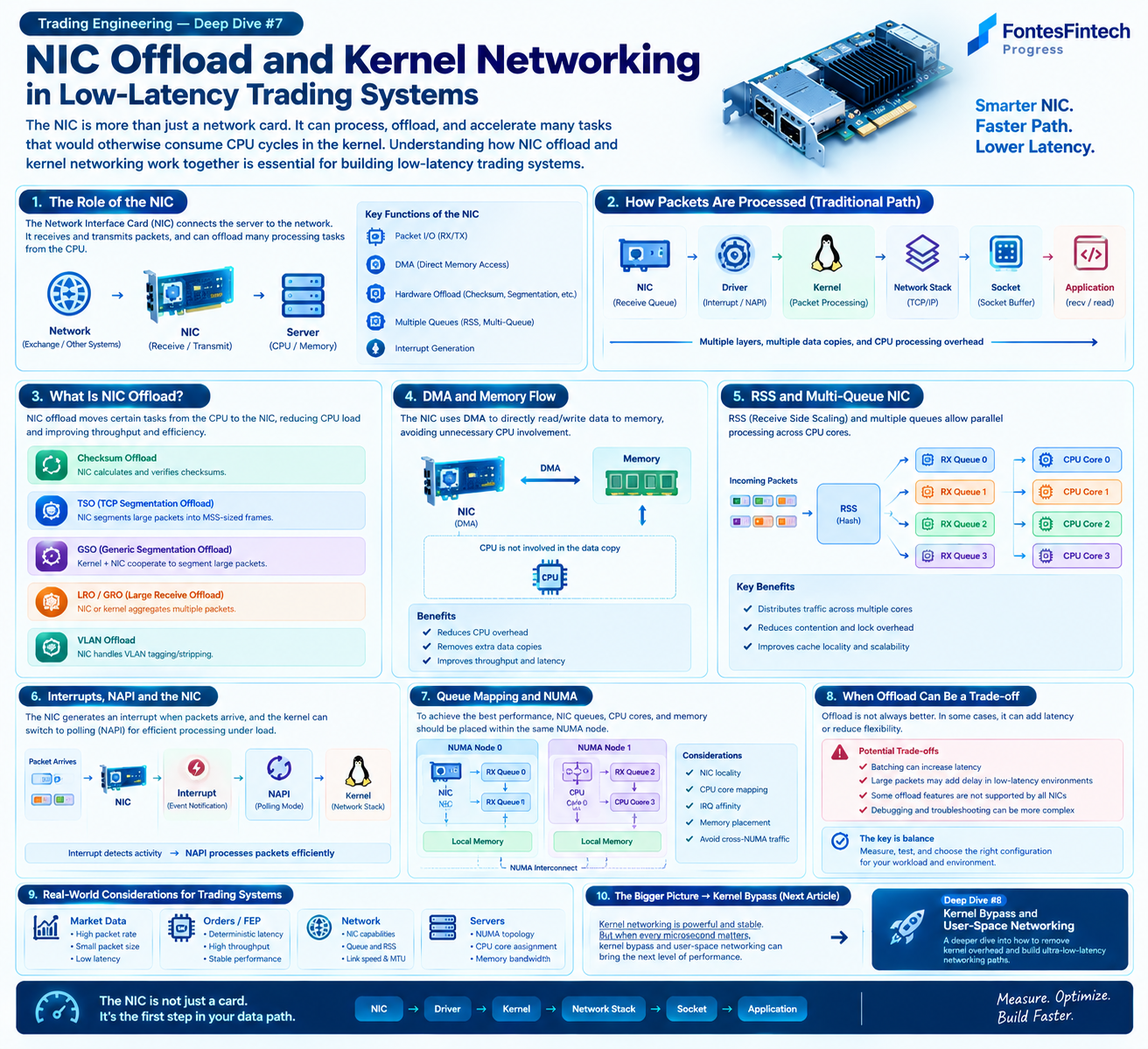
1. What Does a NIC Actually Do?
A NIC provides the interface between the physical network and the server.
At a simplified level:
Network
   ↓
NIC
   ↓
Server Memory
   ↓
CPU
Modern NICs can perform much more than simply transmitting and receiving packets.
Depending on the hardware, a NIC may provide features such as:
- DMA
- Hardware checksum offload
- TCP segmentation offload
- Receive-side scaling
- Multiple RX/TX queues
- Interrupt processing
- Packet filtering
- Hardware packet steering
Therefore:
The NIC can perform part of the network-processing work that would otherwise involve the CPU.
This becomes increasingly important as packet rates increase.
2. The Traditional Packet Processing Path
A simplified Linux networking path can look like this:
Packet
  ↓
NIC
  ↓
Driver
  ↓
Interrupt / NAPI
  ↓
Kernel Network Stack
  ↓
Socket
  ↓
Application
For market data:
Exchange
   ↓
NIC
   ↓
Kernel
   ↓
Socket
   ↓
Market Data Handler
   ↓
Order Book
   ↓
Strategy
Each layer has a purpose.
However, every additional processing stage can also affect:
- CPU cycles
- Cache behavior
- Memory access
- Scheduling
- Latency
- Tail latency
The important point is not that the Linux network stack is inefficient.
It is that a general-purpose network stack is designed to support a very broad range of workloads.
A specialized trading system may have very different requirements.
3. NIC Offload
Modern NICs often provide hardware offload features.
The basic idea is:
Move some network-processing work from the CPU to the NIC hardware.
Common examples include:
Checksum Offload
The NIC can calculate or verify packet checksums.
CPU
 ↓
Prepare Packet
 ↓
NIC
 ↓
Checksum
 ↓
Transmit
This can reduce CPU work.
TCP Segmentation Offload — TSO
Instead of requiring the CPU to prepare many small TCP segments, the NIC can perform segmentation for a larger buffer.
Conceptually:
Large TCP Data
      ↓
     NIC
   ↙  ↓  ↘
Segment Segment Segment
This is useful particularly for throughput-oriented workloads.
Generic Segmentation Offload — GSO
GSO allows the operating system to handle a larger packet representation and defer segmentation.
The actual segmentation can occur later in the networking path.
Generic Receive Offload — GRO
GRO can combine multiple received packets into a larger logical unit inside the kernel networking path.
This can reduce per-packet processing overhead.
Receive Side Scaling — RSS
RSS distributes incoming network flows across multiple RX queues and CPU cores.
                 NIC
                  │
        ┌─────────┼─────────┐
        ↓         ↓         ↓
      RX Queue  RX Queue  RX Queue
        ↓         ↓         ↓
      CPU 0     CPU 1     CPU 2
This allows multiple CPU cores to process network traffic concurrently.
4. DMA and Memory Flow
Another important NIC feature is DMA — Direct Memory Access.
A NIC can transfer packet data directly to memory without requiring the CPU to copy every byte itself.
Conceptually:
Network
   ↓
  NIC
   │
   │ DMA
   ↓
Memory
   ↓
CPU
The CPU still has work to do.
For example:
- Processing descriptors
- Handling interrupts/NAPI
- Running the network stack
- Processing packets
- Executing application logic
But DMA can significantly reduce unnecessary CPU involvement in data movement.
This is one of the fundamental mechanisms behind high-performance networking.
5. RSS and Multi-Queue
Modern NICs often provide multiple receive queues.
For example:
                  NIC
                   │
       ┌───────────┼───────────┐
       ↓           ↓           ↓
     Queue 0     Queue 1     Queue 2
       ↓           ↓           ↓
     CPU 0       CPU 1       CPU 2
RSS can distribute flows across these queues.
This is useful for high-throughput workloads because multiple CPU cores can process different traffic concurrently.
However:
More queues do not automatically mean lower latency.
The important question is:
Where does each queue actually go?
That leads directly to CPU Affinity and NUMA.
6. RSS Is Not Automatically Better
Consider a system with two NUMA nodes:
NUMA Node 0
 ┌──────────────┐
 │ CPU 0        │
 │ CPU 1        │
 │ Local Memory │
 └──────────────┘

NUMA Node 1
 ┌──────────────┐
 │ CPU 2        │
 │ CPU 3        │
 │ Local Memory │
 └──────────────┘
Suppose a NIC is physically connected to NUMA Node 0.
If packets received by the NIC are processed by CPU 2, the system may introduce remote memory access depending on the buffer and memory placement.
Therefore, we need to think about:
NIC Queue → CPU → Memory
rather than looking at RSS alone.
This is why high-performance networking is closely connected to:
- CPU Affinity
- IRQ Affinity
- NUMA
- Memory Locality
- Application Thread Placement
7. NIC Queue and NUMA
Consider a more appropriate configuration:
              NIC
               │
               ↓
          RX Queue 0
               │
               ↓
            CPU 0
               │
               ↓
        Local Memory
The NIC, CPU, and memory are located within the same NUMA domain.
This can help minimize remote memory access.
A less favorable topology might look like:
              NIC
               │
               ↓
          RX Queue 0
               │
               ↓
            CPU 3
               │
               ↓
        Remote Memory
The exact performance impact depends on the hardware and workload.
But the architectural principle is important:
NIC placement, CPU placement, and memory placement should be considered together.
8. Interrupts, NAPI and the NIC
When a packet arrives, the NIC needs to notify the system that work is available.
A simplified model is:
Packet Arrival
      ↓
     NIC
      ↓
   Interrupt
      ↓
     NAPI
      ↓
 Network Stack
      ↓
   Application
Linux networking commonly uses NAPI, which combines interrupt-driven notification with polling-based packet processing.
The basic idea is:
- A packet arrives.
- The NIC triggers an interrupt.
- The system schedules network processing.
- The driver processes packets using polling.
- The system returns to normal interrupt-driven behavior when the workload decreases.
This hybrid approach helps balance:
Latency + CPU efficiency + High Packet Rate
The exact behavior depends on the driver and configuration.
9. Interrupt Affinity Matters
Modern NICs can have many queues.
Each queue may be associated with interrupt processing on a particular CPU.
Conceptually:
NIC
 │
 ├── RX Queue 0 → CPU 0
 ├── RX Queue 1 → CPU 1
 ├── RX Queue 2 → CPU 2
 └── RX Queue 3 → CPU 3
If the application thread processing Queue 0 is running on CPU 0, the system may have better locality.
For example:
NIC
 ↓
RX Queue 0
 ↓
IRQ CPU 0
 ↓
Market Data Thread CPU 0
 ↓
Local Cache
 ↓
Local Memory
This creates a more predictable processing path.
It is therefore useful to consider:
NIC Queue → IRQ CPU → Application CPU
as one chain.
10. NIC Offload Does Not Always Reduce Latency
This is an important distinction.
NIC offload can reduce CPU work.
But reducing CPU utilization does not automatically mean reducing latency.
For example, an aggregation mechanism may process several packets together:
Packet 1 ┐
Packet 2 ├→ Aggregation → Processing
Packet 3 ┘
This can improve efficiency.
But waiting for additional packets may introduce some delay.
Therefore:
An optimization for throughput is not necessarily an optimization for latency.
This is especially important in trading systems.
The right question is not:
"Does this feature reduce CPU usage?"
but:
"How does this feature affect the actual latency distribution?"
11. Throughput and Latency Are Different Goals
General-purpose server applications often prioritize:
- High throughput
- Efficient CPU utilization
- High connection count
- Overall system efficiency
Low-latency trading systems may instead prioritize:
- Minimum latency
- Predictable latency
- Low tail latency
- Stable packet-processing time
Therefore, average latency alone is not enough.
We need to examine:
- P50
- P95
- P99
- P99.9
- Maximum latency
This connects directly to the End-to-End Latency discussion in Trading Engineering #10.
12. Applying NIC Architecture to Trading Systems
Consider a market-data path:
Exchange
   ↓
Network
   ↓
NIC
   ↓
RX Queue
   ↓
CPU
   ↓
Market Data Handler
   ↓
Order Book
   ↓
Strategy
And an order path:
Strategy
   ↓
Risk Check
   ↓
Order Manager
   ↓
FEP
   ↓
NIC
   ↓
Network
   ↓
Exchange
The NIC is present on both sides.
Therefore, NIC performance is part of the complete trading path.
For DMA systems, this becomes particularly important because the system is designed around a very short processing path.
13. The NIC Is Part of the Data Path
A low-latency trading system can be viewed as:
NIC → Queue → CPU → Cache → Memory → Application → FEP
Optimizing only the NIC may not produce a meaningful improvement if another part of the path dominates.
For example:
NIC
 ↓
Fast
 ↓
CPU
 ↓
Cache Miss
 ↓
Remote NUMA Memory
 ↓
Lock Contention
 ↓
Application
The NIC may be extremely fast, but the overall system can still be slow.
This is why the previous Deep Dive topics are connected.
CPU Cache → False Sharing → CPU Affinity → NUMA → Polling → Interrupts → NIC
are all parts of the same system.
14. Inspecting NIC Configuration
Linux provides several useful tools for examining NIC configuration.
For example:
ethtool -k eth0can show various NIC offload features.
To inspect channel and queue configuration:
ethtool -l eth0NIC statistics can be inspected with:
ethtool -S eth0Interrupt distribution can be examined using:
cat /proc/interruptsAnd NUMA topology can be inspected with:
numactl --hardwareThe exact interface name and available features depend on the system.
The goal is not simply to collect configuration information.
The goal is to understand:
NIC → Queue → CPU → Memory → Application
as one complete path.
15. NIC Networking and Kernel Bypass
At this point, the next question naturally appears:
Can we reduce the Kernel's involvement in this path?
The traditional path is:
NIC
 ↓
Driver
 ↓
Kernel
 ↓
Network Stack
 ↓
Socket
 ↓
Application
A user-space networking architecture can look more like:
NIC
 ↓
User-Space Network
 ↓
Application
This is the basic idea behind Kernel Bypass.
Technologies such as:
- DPDK
- AF_XDP
- Onload-style networking
- Other user-space networking frameworks
take different approaches to reducing or optimizing the conventional networking path.
However, Kernel Bypass introduces its own trade-offs.
It can require:
- Dedicated CPU cores
- NUMA-aware memory management
- Specialized packet buffers
- Queue management
- Polling
- More application responsibility
Therefore:
Kernel Bypass is an architectural choice, not simply a switch for making networking faster.
We will examine this in detail in Deep Dive #8.
16. FontesFintech Engineering Approach
At FontesFintech, we do not assume that every NIC feature should simply be enabled or disabled.
The correct configuration depends on the workload.
Our approach is:
Configuration → Measurement → Benchmark → Comparison
For example, we may compare:
- Different RX/TX queue configurations
- CPU affinity
- IRQ affinity
- NUMA placement
- Offload settings
- Polling behavior
- Kernel networking
- User-space networking
The important metric is the actual end-to-end result.
Not:
"This configuration looks faster."
But:
"The measured latency distribution improved under the target workload."
Conclusion
A NIC is much more than a network connector.
Modern NICs provide:
- DMA
- Hardware Offload
- RSS
- Multi-Queue
- Interrupt processing
- Packet steering
And these features interact directly with:
- CPU Affinity
- NUMA
- Memory Locality
- Kernel Networking
- Application Architecture
The complete path can be viewed as:
NIC → Queue → CPU → Cache → Memory → Kernel → Application
For low-latency trading systems, optimizing one component in isolation is rarely enough.
The real objective is to understand the entire data path and reduce unnecessary work while maintaining predictable behavior.
The NIC is not just a card.
It is the first step in your data path.
Measure First. Optimize with Evidence.
Next — Trading Engineering Deep Dive #8
Kernel Bypass and User-Space Networking in Low-Latency Trading Systems
How can we reduce Kernel involvement in the network path?
What are DPDK, AF_XDP, and Onload-style networking?
And when does Kernel Bypass actually make sense for a trading system?


